
Microsoft Learn updated Control how agents are shared on 5 November 2026, one day after it published a companion page, Configure sharing agents with embedded maker credentials (last updated 4 November 2026). Together they describe a new environment-level control that can stop a Copilot Studio agent from being shared or published when it carries a connection that runs on the maker’s own credentials and is not safe to share.
The governance point is simple and overdue: an agent that quietly reuses one maker’s sign-in for every user is an identity problem, and admins now have a switch for it. The catch is that the Copilot Studio documentation and the Power Platform admin documentation describe that switch in two different places, with two different sets of option names, and only one of them says it is in preview. Before turning it on, admins should know which description matches their tenant.
The capability at a glance
| Aspect | What the documentation says |
|---|---|
| Setting name | Sharing agents with embedded maker credentials |
| Scope | “The setting applies per environment.” The Power Platform admin page adds that it can be set for “an individual environment or an environment group.” |
| Location (Copilot Studio page) | Power Platform admin center, Manage, Environments, select the environment, Settings, Features |
| Location (Power Platform admin page) | Power Platform admin center, Security, Threat detection, Sharing agent with embedded maker credentials |
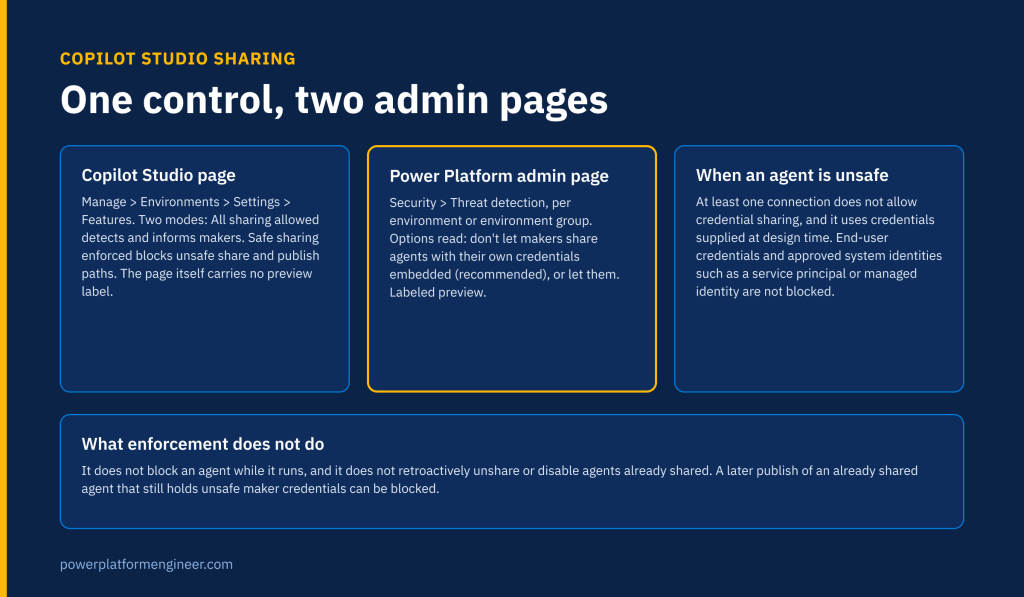
| Options (Copilot Studio page) | All sharing allowed: “detects and informs makers about unsafe credential use, but doesn’t block sharing.” Safe sharing enforced: “blocks applicable publish or share paths when an agent is unsafe for sharing.” |
| Options (Power Platform admin page) | “Don’t let makers share agents with their own credentials embedded (recommended)” or “Let makers share agents with their own credentials embedded” |
| Status | The Power Platform admin article is titled “(preview)” and marked as prerelease documentation. The two Copilot Studio pages carry no preview label in their own text. |
| What counts as unsafe | At least one connection that does not allow credential sharing, and that connection uses credentials supplied at design time rather than asking each user to sign in |
| Not affected | Connections that use end-user credentials, and agents that use an approved system identity “such as a service principal, API key, or managed identity” |
| Existing agents | “Enabling enforcement doesn’t retroactively unshare or disable agents that were previously shared.” A later publish of an already shared agent can be blocked. |
| Runtime | “It doesn’t block an agent while the agent is running.” |
Why maker credentials are an identity problem
When a maker adds a tool to an agent and signs the connection in with their own account, every user who later chats with the agent can act through that account. The Copilot Studio page defines the risk precisely: an agent is unsafe for sharing when it “uses at least one connection that doesn’t allow credential sharing” and that connection “uses credentials supplied at design time instead of asking each user to authenticate with their own credentials.”
That is the same pattern Power Platform Engineer flagged for workflows in The Copilot Node Lets a Workflow Act as a Microsoft 365 User: the connection, not the agent, decides whose data is reachable. The new control finally lets an admin act on that at the sharing boundary instead of relying on maker discipline.
The control also looks past the agent itself. The page says “an agent might call a flow or another agent that uses a nonshareable connection” and that “as dependency-based enforcement becomes available, an unsafe dependency can cause the calling agent to be treated as unsafe for sharing.” The wording “as dependency-based enforcement becomes available” signals that dependency checks are still arriving, so an agent that passes today may fail after a later rollout.
One control, two descriptions
The Copilot Studio page sends admins to Manage, Environments, Settings, Features and offers a detect-only mode, All sharing allowed, which Microsoft recommends using “to assess impact, educate makers, and prepare an environment before enforcement.” The Power Platform admin page sends admins to Security, Threat detection and offers what reads as a simple allow or block choice, with blocking marked as recommended. It does not mention a detect-only mode, and it does not state a default.
These may be the same setting surfaced in two places of the admin center, or the documentation may be describing two stages of the same rollout. Neither page says which. Admins who manage environments through environment groups should note that only the Power Platform admin page mentions groups. This is one more control spread across admin surfaces, a pattern covered in Copilot Studio Agent Governance Now Spans Five Admin Centers.
What makers will see
Control how agents are shared describes the maker experience in detail. Copilot Studio “surfaces connection-sharing violations in Agent status.” For an authenticated agent that has not been shared, a warning shows how many connections violate the policy. For an agent already shared, “the validation reports the violation as a critical error.” Affected tools are marked Blocked with a Sharing policy violation message, and “if a tool is also restricted by a data policy, Copilot Studio surfaces the Data policy violation message instead.” That precedence matters for support teams: a maker who sees a data policy message may still have a credential problem underneath. The data policy side is covered in Copilot Studio Data Policies Now Apply to Every Agent.
When enforcement applies, makers “can still edit and save an unsafe agent, but they can’t newly share it.” The agent cannot be shared with viewers or end users, and “you can’t share the agent with everyone in your organization for end-user access.” Publishing is blocked too where it would expose an already shared agent. For channels that publish without a separate Share action, the Copilot Studio page says “enforcement occurs primarily when the maker publishes the agent.”
The older sharing limits still matter
The same page also covers the Managed Environments sharing limits: whether owners can grant Editor permissions, whether they can grant Viewer permissions, whether sharing is restricted to individuals with no security groups, and a cap on the number of viewers. Two limits on those controls are easy to miss. First, “sharing limits only apply to agents that require authentication,” so an agent set to no authentication is outside them. Second, rules apply when someone tries to share and do not remove existing access; an out-of-compliance agent can only be unshared until it complies, and rules can take “up to an hour” to be enforced.
Read together, the two controls answer different questions. The sharing limits decide how widely an agent can be shared. The embedded credentials control decides whether it can be shared at all when it carries a maker’s sign-in.
What the documentation does not cover yet
As read on 20 November 2026, the pages leave these questions open:
- The default value of the embedded credentials setting in new and existing environments.
- Whether the embedded credentials setting requires Managed Environments or any license. The sharing limits are explicitly a Managed Environments control; the credentials setting page states no requirement.
- How the Settings, Features location and the Security, Threat detection location relate, and why their option names differ.
- The maximum number of viewers allowed when the viewer limit is on. No number is given.
- Whether agents on the Microsoft Copilot harness, MCP server tools or named channels are in scope. Neither Copilot Studio page names a harness, MCP or a channel list.
- The exact error text makers see in the sharing dialog. The page says only that it “displays an error message and identifies the affected target.”
- When dependency-based enforcement for called flows and connected agents arrives, and how it will be announced.
- Any audit event or admin report listing agents currently in violation across a tenant.

Admin checklist
- Open both locations in the Power Platform admin center for one test environment and record which option names your tenant shows.
- Start in a development or validation environment in the detect-only mode, as the Copilot Studio page recommends, and read the Agent status warnings it produces.
- Inventory shared agents with maker-credential connections now. Enforcement will not unshare them, but their next publish can be blocked, which can surprise a team mid-release.
- Move user-specific tools to end-user authentication, and replace shared maker connections with an approved service principal or managed identity where a shared service identity is truly needed.
- Include called flows and connected agents in reviews, since dependency checks are expanding.
- Confirm production agents require authentication, otherwise Managed Environments sharing limits do not apply to them.
- Brief the support desk on the difference between Sharing policy violation and Data policy violation messages.
- Enable enforcement environment by environment, or through an environment group, after high-priority agents are reviewed.
Sources
- Control how agents are shared, Microsoft Learn, last updated 5 November 2026
- Configure sharing agents with embedded maker credentials, Microsoft Learn, last updated 4 November 2026
- Control sharing agents with embedded maker credentials (preview), Microsoft Learn, last updated 5 November 2026
- Limit sharing, Microsoft Learn, last updated 2 March 2026
- What’s new in Copilot Studio, Microsoft Learn, last updated 12 November 2026