
Microsoft Learn’s Memory (Microsoft Copilot) (preview) article, last updated on 21 October 2026, describes how a Copilot Studio agent can remember details from its interactions and use that context in later conversations. The page labels it “a production-ready preview feature” and promises that “one person’s context is never shared with another.” That promise holds for one memory model only. Copilot Studio documentation now describes three, each with a different privacy boundary, and the governance point is simple: before any agent remembers anything, admins need to know which of the three models it uses, because the maker turns memory on and no admin control for it is documented.
Three memory models at a glance
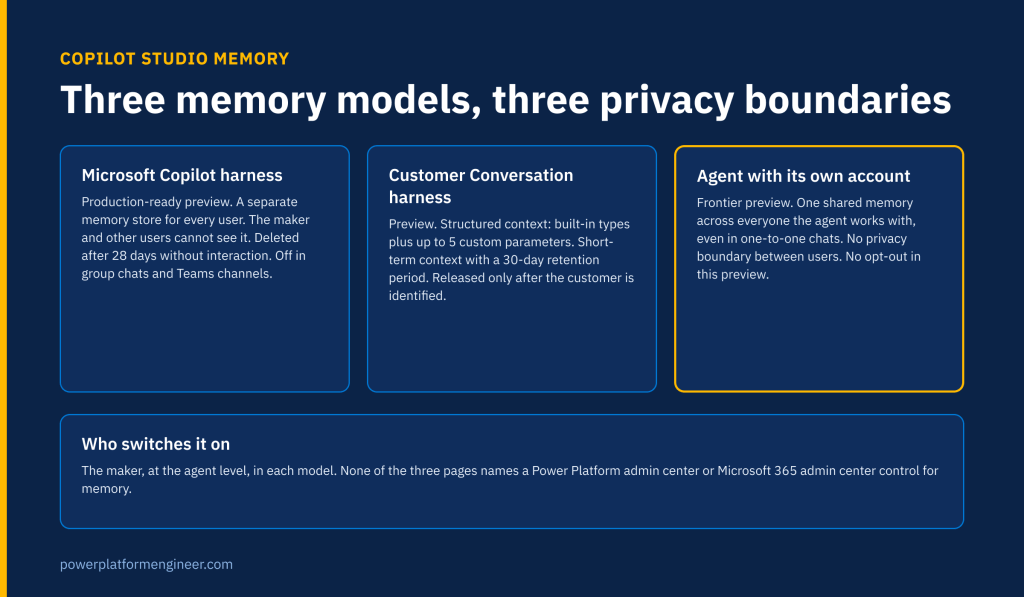
The memory page itself points to a second model for the Customer Conversation harness, and the Frontier article on giving an agent its own account describes a third. Read together, they look like this.
| Aspect | Microsoft Copilot harness | Customer Conversation harness | Agent with its own account |
|---|---|---|---|
| Status as documented | Production-ready preview | Preview | Frontier preview program |
| Whose memory | “a separate memory store for every user” | “a separate memory store per user,” linked across channels by a shared contact identifier | “one memory across everyone it works with” |
| What is kept | User preferences and relevant context, saved as files | Structured schema: customer profile, conversation history and up to 5 custom parameters | Team processes, terminology and “details about individual people” |
| Retention | Deleted after 28 days without interaction | “a retention period of 30 days” | Not stated |
| Who can see it | Only the user; “makers can’t view end users’ memories” | Not stated; context can be surfaced to human agents | “Anyone who works with the agent” |
| Opt-out | User can view and delete; maker can turn Memory off | Agent-level on or off control | “You can’t opt out of shared memory in this preview” |
| Admin control named | None | None | None for memory (the Agent accounts setting governs the account itself) |
The maker, not the admin, turns memory on
For agents on the Microsoft Copilot harness, the switch sits in the agent itself: the maker opens the agent, selects the Build tab and uses the Memory toggle in the components panel. “As the maker, you turn Memory on or off for each agent.” The page does not mention the Power Platform admin center, the Microsoft 365 admin center, environment settings or a data policy. The Customer Conversation page describes the same pattern: “A single control at the agent level turns Memory on or off.”
That puts memory in the same position as several recent Copilot Studio capabilities: a maker-level decision with tenant-level consequences. Power Platform Engineer has already mapped the five admin centers that now govern Copilot Studio agents, and checked what Copilot Studio data policies actually name. Memory appears in neither list of documented controls. Until Microsoft documents one, the control point is your maker guidance, your solution review and your environment strategy.
Private by design, but stored somewhere you cannot see
The Microsoft Copilot harness model is the most conservative of the three. “Each user’s memory lives in a dedicated folder in Microsoft-managed storage that the agent reads from and writes to.” The agent captures signals such as preferences, stores them as files and applies them on later interactions. Users can ask the agent in chat what it remembers, update a memory or ask it to forget something, and a memory portal lets them “View memories” or “Delete all memories.”
Three details matter for governance. First, “If a user doesn’t interact with the agent for 28 days, the system deletes their memories from that agent.” That is an inactivity rule, not a maximum age: an active user’s memories have no documented expiry. Second, “Turning Memory off doesn’t delete stored memories. It only prevents the agent from using them.” Retiring the feature on an agent is therefore not the same as purging what it holds. Third, “User memory is disabled in group chats and Microsoft Teams channels,” which removes the most obvious leakage path but leaves one-to-one Teams chats and Microsoft Copilot in scope.
The storage location is described only as “Microsoft-managed storage.” Unlike files that agents create for users, which land in places admins already govern, memory files sit in a store the page does not tie to Dataverse, OneDrive or any region.
Customer-facing memory is structured and time-boxed
The Customer Conversation memory page (also last updated 21 October 2026, preview) takes a different approach. “Rather than free-form recall, Customer Conversation harness memory captures structured context through a defined schema of built-in and custom parameters, and covers short-term conversation context only, with a retention period of 30 days.” Makers can add up to 5 custom parameters, each with up to 10 allowed values, which gives a reviewer a finite list of what the agent may retain.
Identity is the gate: “Context is only released once the customer has been identified: Chat channels authenticate the user first, and Speech relies on the caller’s phone number.” A shared contact identifier links a phone caller and a chat user into one customer. For contact center teams, that means the quality of the identifier mapping is now a data protection control, and a phone number alone is the identity proof for speech.
Shared memory removes the privacy boundary
The third model is the one to watch. In the Frontier article Give your agent an account (last updated 15 October 2026), an agent with its own Microsoft Entra account “uses shared memory rather than personal memory, even in one-to-one chats.” The page is direct about the consequence: “shared memory has no privacy boundary between users,” and the People card warns that shared files or chats “can be summarized and included in the agent’s responses to any user, even users without permissions to the files or chats and regardless of sensitivity label.”
Asked whether users can opt out, the page answers: “No. You can’t opt out of shared memory in this preview. By using the agent, you consent to its use of shared memory.” For any tenant that relies on permissions and sensitivity labels as the boundary for what a person can learn, this is a design choice that sits outside that boundary. It belongs in a Frontier enrolment decision, not in a maker’s afternoon.

What the documentation does not cover yet (as of 18 November 2026)
- Any admin control for memory in the Power Platform admin center, the Microsoft 365 admin center, environment settings or data policies.
- Where “Microsoft-managed storage” is located, whether it follows the environment’s geography, and how it is encrypted.
- Whether memories are discoverable through Microsoft Purview, eDiscovery or audit, and whether sensitivity labels travel with remembered content.
- Licensing or Copilot Credits consumption for memory reads and writes.
- How an admin can find or delete a specific user’s memories, for example in response to a data subject request.
- A retention period or deletion route for shared memory in agents with their own account.
- Consistent naming: the Customer Conversation page still says the other Memory feature “applies to agents powered by the GitHub Copilot harness,” while the memory page names the Microsoft Copilot harness. Power Platform Engineer covered that rename earlier this month.
Admin checklist
- Inventory agents on the Microsoft Copilot harness and record which have the Memory toggle on.
- Add memory to your agent review: why the agent needs it, what users are likely to share, and whether the 28-day inactivity rule is acceptable.
- Tell makers that turning Memory off does not delete stored memories, and decide how users will be asked to clear them before an agent is retired.
- For Customer Conversation agents, review every custom parameter and its allowed values as you would a data collection form, and confirm the shared contact identifier mapping.
- Treat Frontier agent accounts as a separate decision. Do not enable the Agent accounts setting until stakeholders accept shared memory with no permission boundary and no opt-out.
- Ask your Microsoft account team where memory is stored and how it is covered by Purview, residency and data subject request processes, and record the answer.
- Keep production-ready preview and Frontier preview terms in your risk register, since both pages say the feature is subject to change.
Sources
- Memory (Microsoft Copilot) (preview), Microsoft Learn, last updated 21 October 2026
- Memory (Customer Conversation) (preview), Microsoft Learn, last updated 21 October 2026
- Give your agent an account (Frontier), Microsoft Learn, last updated 15 October 2026
- What’s new in Copilot Studio, Microsoft Learn, last updated 12 November 2026