
Every agent your organization builds now has a price tag that moves with its design. Microsoft’s October 2026 Copilot Credits Guide makes Copilot Credits the common currency across Copilot Cowork, Copilot Code, Copilot in SharePoint, Work IQ APIs, Copilot Studio, Teams Phone Agent, and the Copilot Managed Runtime. For Power Platform teams, the most consequential detail sits in the Copilot Studio section: agents now run on one of three harnesses, and the harness you pick changes not only what the agent can do but how, when, and how much you are billed.
This article translates the guide and the current Microsoft Learn billing documentation into a working cost model. We will price the same two business scenarios on the standard harness (topics, tools, agent flows, Power Automate) and on the GitHub Copilot harness (agents and workflows), then turn the results into a set of design and governance practices that keep agentic adoption economical across the organization.
What matters in the October 2026 guide
Before getting into numbers, five points from the guide frame everything that follows.
- One currency, one tenant pool. Copilot Credits are pooled at the tenant level, and total cost is the sum of credits consumed across every supported experience. A runaway agent in one environment draws from the same pool as Copilot in SharePoint and Teams Phone Agent.
- Two ways to buy. The Copilot Studio pay-as-you-go meter at $0.01 per credit, billed in arrears, or the Copilot Credit Pre-Purchase Plan (P3), a one-year upfront commitment with discounts from 5% at 300,000 credits to 20% at 300,000,000 credits. Unused P3 credits expire at the end of the term. Both decrement a Microsoft Azure Consumption Commitment.
- Three harnesses in Copilot Studio. The GitHub Copilot harness for agents and workflows that automate end-to-end processes, the standard harness for rule-based agents and agent flows, and the Copilot Chat harness for agents that extend Microsoft Copilot with organizational knowledge.
- The license inclusion is harness-specific. Runtime for standard harness and Copilot Chat harness agents in Microsoft channels is included with the Microsoft Copilot user subscription license, subject to fair usage limits. The GitHub Copilot harness is not: Microsoft Learn states that usage by agents powered by the GitHub Copilot harness is not included with a user’s Microsoft 365 Copilot license.
- Billing starts at different moments. The standard harness bills after publish. The GitHub Copilot harness bills from the moment a maker starts building, including natural language authoring, preview, testing, and evaluations.
Point five is the one most organizations will miss. On the GitHub Copilot harness, an exploration environment full of experiments consumes real credits even if nothing is ever published. Microsoft also notes that developer and trial environments moved to usage-based billing on September 1, 2026.
The two billing models side by side
Standard harness: you pay per event
Standard harness agents are billed by feature events. The current Microsoft Learn rate card (last updated October 1, 2026) is the basis for every standard harness calculation in this article.
| Event | Copilot Credits | Pay-as-you-go cost | Microsoft Copilot licensed user |
|---|---|---|---|
| Classic answer (authored topic response) | 1 | $0.01 | No charge |
| Generative answer | 2 | $0.02 | No charge |
| Agent action (trigger, topic transition, tool call, deep reasoning) | 5 | $0.05 | No charge |
| Tenant graph grounding (per message) | 10 | $0.10 | No charge |
| Agent flow actions (per 100 actions) | 13 | $0.13 | No charge, only with the “When an agent calls the flow” trigger |
| Prompt tool, basic / standard / premium (per 10 responses) | 1 / 15 / 100 | $0.01 / $0.15 / $1.00 | No charge |
| Content processing (per page) | 8 | $0.08 | No charge |
Two footnotes on that page carry real weight. First, the “no charge” column applies only to employee-facing scenarios where the agent operates with the authenticated identity of a user who holds a Microsoft Copilot license. Autonomous triggers, external customers, and unlicensed employees all consume credits. Second, Power Automate cloud flows use Power Automate licensing, not Copilot Credits. Only agent flows managed in Copilot Studio are billed at 13 credits per 100 actions.
GitHub Copilot harness: you pay per task
The GitHub Copilot harness charges for LLM tokens, tools (including knowledge and MCP servers), and the harness itself. There is no fixed rate card per event, so Microsoft publishes planning bands instead.
| Stage | Light | Medium | Heavy |
|---|---|---|---|
| Natural language creation (per authoring scenario) | 1 to 20 credits (1 to 2 turns) | 21 to 60 credits (3 to 5 turns) | 61+ credits (6+ turns) |
| Runtime (per task) | 100 to 300 credits | 300 to 500 credits | More than 500 credits |
| Runtime cost per task at pay-as-you-go | $1.00 to $3.00 | $3.00 to $5.00 | More than $5.00 |
Put the two models next to each other and the economics become clear. An agent flow action costs 0.13 credits. A classic answer costs 1. A single light task on the GitHub Copilot harness costs 100 to 300. That is roughly three orders of magnitude between the cheapest deterministic step and the cheapest reasoning task.
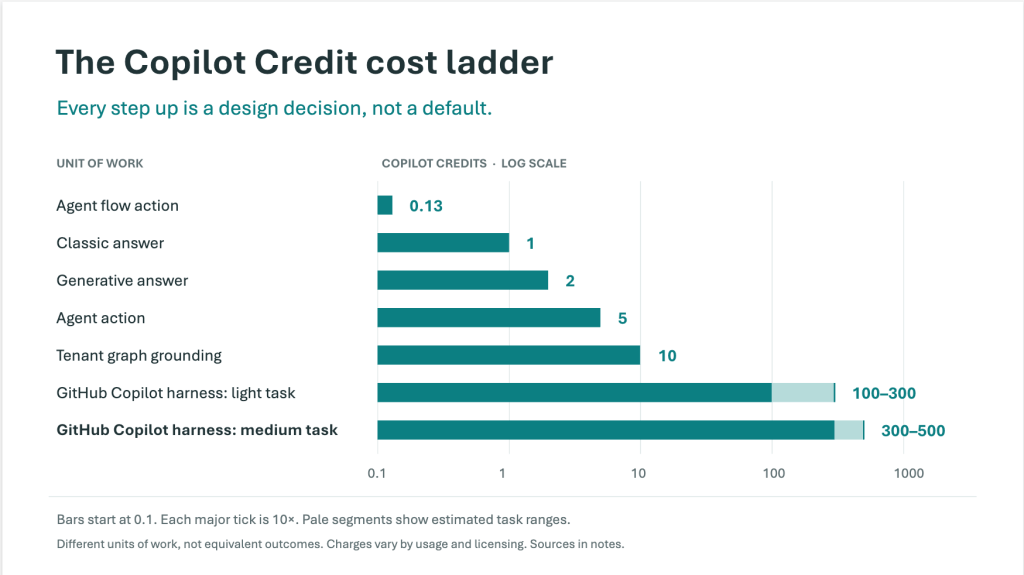
This does not make the GitHub Copilot harness a bad choice. It makes it a deliberate one. Microsoft positions it for reasoning-heavy work such as an accounts payable process that reads invoices, matches them to purchase orders, and routes exceptions. The question is never “which harness is cheaper” but “which parts of this process actually need reasoning.”
Use case 1: IT service desk agent
Scenario. A 2,500-employee organization deploys an internal IT service desk agent in Teams. It answers password, VPN, and device questions from a SharePoint knowledge base, and raises a ServiceNow ticket when it cannot resolve the issue. Volume is 4,000 conversations a month.
Assumed conversation profile. Two classic answers from authored topics, one generative answer from the knowledge base, and a ticket created in half of all conversations by a 25-action flow. These are planning assumptions; validate them against your own activity maps before committing a budget.
Design A: standard harness, classic orchestration, topics plus agent flow
| Event | Calculation | Credits per conversation |
|---|---|---|
| Classic answers | 2 x 1 | 2.000 |
| Generative answer | 1 x 2 | 2.000 |
| Ticket agent flow | 0.5 x (25 / 100) x 13 | 1.625 |
| Total | 5.625 |
Monthly: 5.625 x 4,000 = 22,500 credits, or $225 at pay-as-you-go if no user holds a Microsoft Copilot license. If 60% of conversations come from Copilot-licensed employees in Teams and the ticket flow uses the “When an agent calls the flow” trigger, only the remaining 40% is billable: 9,000 credits, or $90 a month.
Design B: standard harness, generative orchestration
Switching the same agent to generative orchestration changes the billing, because Microsoft states that topics and actions become agent actions in generative orchestration mode. Each topic selection and each tool call is now 5 credits.
| Event | Calculation | Credits per conversation |
|---|---|---|
| Topic selected by the orchestrator | 1 x 5 | 5.000 |
| Classic answers inside the topic | 2 x 1 | 2.000 |
| Generative answer | 1 x 2 | 2.000 |
| Ticket tool call | 0.5 x 5 | 2.500 |
| Ticket agent flow | 0.5 x (25 / 100) x 13 | 1.625 |
| Total | 13.125 |
Monthly: 52,500 credits, or $525. Turning on tenant graph grounding for the generative answer adds 10 credits per grounded message, taking the agent to 23.125 credits per conversation and $925 a month. Generative orchestration often improves the user experience, so this is a legitimate trade, but it should be a conscious one.
Design C: GitHub Copilot harness
Service desk questions fall into the guide’s light task band (few sources, light reasoning, one short output) at 100 to 300 credits per task. At 4,000 tasks a month that is 400,000 to 1,200,000 credits, or $4,000 to $12,000. The Microsoft Copilot license does not offset any of it.

Verdict. A service desk is a structured, high-volume, well-understood scenario, which is exactly the profile Microsoft describes for the standard harness. Build it on the standard harness, authoring the top intents as classic topics and reserving generative answers for the long tail. The GitHub Copilot harness adds capability the scenario does not need, at 18 to 53 times the cost of Design A.
Use case 2: invoice exception agent
Scenario. A finance team processes 1,500 supplier invoices a month. Each invoice averages three pages. Around 20% (300 invoices) fail automatic matching against purchase orders because of price variances, partial deliveries, or missing PO numbers, and today those exceptions consume most of the team’s time. This is the scenario Microsoft itself cites as a fit for the GitHub Copilot harness, which makes it a good test of whether that advice holds at full volume.
Design A: standard harness pipeline
An agent flow triggered by the AP mailbox extracts invoice data with a content processing tool, uses a standard prompt tool to compare lines against the PO from Dynamics 365, posts clean matches, and hands exceptions to a standard harness agent that summarizes the variance and starts an approval.
| Step | Calculation | Credits |
|---|---|---|
| Content processing, 3 pages | 3 x 8 | 24.0 |
| Standard prompt tool, 1 response | 15 / 10 | 1.5 |
| Agent flow, 60 actions | (60 / 100) x 13 | 7.8 |
| Intake per invoice | 33.3 | |
| Exception: agent trigger, generative summary, two tool calls | 5 + 2 + (2 x 5) | 17.0 |
Monthly: (1,500 x 33.3) + (300 x 17) = 55,050 credits, or $550.50. Because the pipeline runs autonomously rather than under a licensed user’s identity, assume none of it is covered by the Microsoft Copilot license.
The catch is capability. Rule-based exception handling works for the variances you anticipated. It struggles with the messy ones: a credit note that partially offsets two invoices, a supplier who changed bank details, a PO split across cost centres. Those are the cases that justify reasoning.
Design B: GitHub Copilot harness for every invoice
An invoice match that pulls from email, Dynamics 365, and SharePoint and produces both a posting and an audit note sits in the medium band at 300 to 500 credits. For 1,500 invoices that is 450,000 to 750,000 credits, or $4,500 to $7,500 a month, with 80% of that spend going to invoices that a deterministic flow would have matched for about 33 credits each.
Design C: hybrid, route the exception, not the invoice
Keep the standard harness intake pipeline for all 1,500 invoices, and send only the 300 exceptions to a GitHub Copilot harness workflow.
| Component | Calculation | Monthly credits | Monthly cost |
|---|---|---|---|
| Standard harness intake | 1,500 x 33.3 | 49,950 | $499.50 |
| GitHub harness exceptions (low) | 300 x 300 | 90,000 | $900.00 |
| GitHub harness exceptions (high) | 300 x 500 | 150,000 | $1,500.00 |
| Total range | 139,950 to 199,950 | $1,399.50 to $1,999.50 |

Verdict. The hybrid costs roughly three times the pure standard harness design but delivers the capability that justified the project, at a quarter to a third of the cost of running everything through the GitHub Copilot harness. Annualized at the midpoint, the hybrid is about 2,039,400 credits. That clears P3 tier 2 (1,500,000 credits at 6% off, $14,100 upfront) with roughly 539,400 credits on pay-as-you-go ($5,394), for $19,494 against $20,394 on pay-as-you-go alone. Only commit to P3 once you have two or three months of real consumption, because unused credits expire.
Do not forget the build cost
On the GitHub Copilot harness, building the exception workflow is billable. A few medium authoring sessions at 21 to 60 credits each are trivial, but preview runs and evaluations are executed as real tasks. Thirty preview runs and a 50-case evaluation set at the medium band midpoint of 400 credits come to about 32,000 credits, or $320, per iteration cycle. Standard harness agents bill after publish, and Microsoft Learn confirms that agent flow test runs from the designer or test chat do not consume capacity.
Agent flows or Power Automate cloud flows?
Both appear as tools to a standard harness agent, but they are licensed differently, and the right choice depends on who uses the agent.
- Agent flows are billed at 13 credits per 100 actions and are included at no charge for Microsoft Copilot licensed users when triggered by “When an agent calls the flow.” For internal agents with a high share of licensed users, this is usually the cheapest option.
- Power Automate cloud flows do not consume Copilot Credits for the flow run itself; they use Power Automate licensing. If the organization already holds Power Automate Premium or Process licenses for high-volume automation, reusing those flows avoids credit consumption for the deterministic steps. The agent action that calls the flow still costs 5 credits under generative orchestration.
- Enforcement differs too. When prepaid capacity runs out, agent flow enforcement blocks new agent flow runs while the agent itself keeps answering. Plan continuity for process-critical agent flows with pay-as-you-go or reserved environment allocation.
How to refine an agent for cost without degrading it
Refinement is where most of the savings live, because real traffic rarely matches the design assumptions. A practical loop for standard harness agents looks like this.
- Read the activity map. Count the billable events in a representative conversation: every topic transition, tool call, grounded message, and generative answer. This is your real per-conversation cost, not the one in the design document.
- Promote the head, keep generative for the tail. Review analytics for the most frequent generative answers. Any question asked hundreds of times a month with a stable answer should become an authored topic with a classic answer.
- Move repeatable steps out of reasoning. If the orchestrator calls three tools in the same sequence every time, collapse them into one agent flow. Three agent actions cost 15 credits; a 30-action agent flow costs 3.9.
- Scope grounding. Use targeted SharePoint or Dataverse knowledge sources and enable tenant graph grounding only where tenant-wide retrieval genuinely improves the answer. At 10 credits per message it is the single largest per-turn surcharge on the standard harness.
- Right-size the model. Reasoning models add 10 credits per 1,000 tokens on top of the feature rate. Prompt tools come in basic, standard, and premium tiers at 1, 15, and 100 credits per 10 responses. Start at the lowest tier that meets your quality bar.
- Trim documents before processing. Content processing is billed per page. Strip cover pages, terms and conditions, and duplicated attachments before the content processing tool sees them.
- Set a monthly limit per agent. In the Power Platform admin center, Licensing, Copilot Studio, Manage Agents lets you cap an individual agent before enforcement affects the rest of the environment.
Choosing the harness deliberately
The cheapest agent is the one whose most expensive component is used only when nothing cheaper will do. A simple decision path, applied per task rather than per agent, captures that principle.

Measures that reduce cost to the company
Design measures
- Default internal, employee-facing agents to the standard or Copilot Chat harness so that Microsoft Copilot licensed users are covered by the license inclusion.
- Adopt the hybrid pattern for process automation: deterministic intake, reasoning for exceptions. Measure the exception rate, because it is the main driver of GitHub Copilot harness spend.
- Build shared agent flows and connected agents once and reuse them across agents, instead of letting every agent reason its way to the same lookup.
- For custom solutions that need Microsoft 365 context, evaluate Work IQ APIs. Microsoft states that shifting processing into the Work IQ runtime reduces tokens for context retrieval and tool use by up to 80%. Note that Work IQ Tools API calls are billed at 0.1 credit each and Work IQ is not included in the Microsoft Copilot license when accessed through the APIs.
Governance measures
- Govern the environment, not just the agent. Microsoft’s governance guidance recommends classifying every environment as exploration and prototyping, test and validation, or funded production, with controls matched to each.
- Contain exploration. Give exploration environments a fixed prepaid allocation and turn off “Draw from the available capacity in my tenant.” New environments can appear with tenant draw turned on, so automate the check with Power Platform Inventory.
- Apply a development limit to every new GitHub Copilot harness agent. The Power Platform admin center has no tenant-wide default agent limit, so use a scheduled process that filters inventory on the harness property and applies your standard limit.
- Restrict who can allocate credits. Allowing environment administrators to manage allocations grants allocation control across every environment in the tenant, not only their own.
- Remember that Azure budgets alert but do not stop. On pay-as-you-go, agent-level hard stops are the only control that halts consumption.
- Watch both admin centers. Copilot Studio capacity lives in the Power Platform admin center; Copilot Cowork, Copilot in SharePoint, and other Microsoft 365 usage-based experiences are governed through Copilot Cost Management in the Microsoft 365 admin center. Prepaid credits can be shared across both.
Purchasing measures
- Start new agents on pay-as-you-go to build a consumption baseline.
- Move to a P3 tier sized to the proven floor of annual consumption, and let pay-as-you-go absorb peaks.
- Model before you build using the Copilot Credit Estimator (Cowork and the GitHub Copilot harness) or the Copilot Credit Estimator for agents (Copilot Studio, Dynamics 365, and Microsoft 365 agents), then validate against Monitor data once live.
Adopting agentic architecture wisely
The harness model gives organizations something they did not have before: a clean way to separate predictable automation from open-ended reasoning, and to price each separately. Used well, it encourages a layered architecture where classic topics handle known answers, flows handle known procedures, grounded generative answers handle knowledge, and the GitHub Copilot harness handles the genuinely ambiguous work that used to land on someone’s desk.
Used carelessly, it lets the most capable harness become the default for everything, with billing that starts at the first prompt in a maker’s sandbox. The difference between those two outcomes is not the technology. It is an intake review that asks which steps need reasoning, an environment strategy that contains exploration, and a cost owner for every agent that reaches production.
Sources
- Microsoft Copilot Credits Guide, October 2026
- Billing rates and management, Microsoft Copilot Studio
- Harnesses in Copilot Studio
- Overview of usage-based billing (GitHub Copilot harness)
- Govern Copilot Credit consumption for agents powered by the GitHub Copilot harness
All figures are illustrative planning estimates based on published Microsoft rates and planning bands as of October 2026, in USD at the pay-as-you-go rate of $0.01 per credit. Actual consumption depends on agent design, model selection, and usage patterns. Pricing and licensing terms are subject to change; confirm with the Microsoft Copilot Studio Licensing Guide and your Microsoft account team before budgeting.