
Most Power Platform tenants do not fail governance because the administrator chose the wrong setting. They fail because the right setting was applied to eleven environments and missed on the twelfth. Environment groups exist to close that gap: they turn a flat list of environments into managed collections, and they let a tenant administrator publish a rule once and have it enforced everywhere inside the collection, locked against local override.
This article covers what environment groups are, how the rule engine actually behaves when environments join and leave, and then walks every rule currently available with a plain answer to the question that matters: what does this rule buy the administration team?

What an environment group actually is
Microsoft describes an environment group as a folder for your environments, and the analogy holds. You cluster environments into logical collections based on whatever dimension matters to your organization: business unit, project, region, lifecycle stage, or purpose. The value is not the folder itself. The value is that the folder carries policy.
Before you design your group structure, four constraints shape every decision you will make:
- Managed environments only. An environment group can only contain managed environments. If an environment is not managed, it cannot join. This makes environment groups a premium governance capability, not a universal one.
- One group per environment. Groups do not overlap and cannot be nested. An environment belongs to exactly one group or to no group at all. Your grouping dimension has to be your primary governance dimension, because you only get one.
- Regions and types can mix. Environments in a single group can span different regions and different environment types, as long as every member is managed.
- Movement is manual. Transferring an environment between groups means removing it from one and adding it to the other. There is no move operation.
That second constraint deserves more weight than it usually gets in planning conversations. If you group by region for data residency, you cannot also group by lifecycle stage for ALM enforcement. You have to decide which dimension carries the rules and handle the other dimension through a different mechanism, such as data policies, tenant settings, or naming conventions backed by process.
How rules behave: the part that surprises people
A rule is a setting or policy defined once at the group level. When you publish it, the corresponding setting inside every member environment becomes read only. A local system administrator can see the setting but cannot change it. Only a tenant administrator with edit rights at the environment group level can change it going forward.
Four behaviors define the lifecycle, and each one has an operational consequence.

Saving is not publishing
When you configure a rule and save it, nothing is enforced yet. Changed rules appear in bold with an asterisk beside them until you select Publish rules in the command bar. This trips up administrators who configure a careful rule set, walk away, and assume the environments are governed. They are not. Every time you change a rule afterwards, you have to republish for the change to reach member environments.
Untouched rules stay local
You do not have to configure every rule. Rules you never touch continue to be managed at the environment level, which means local administrators retain control over them. This is the intended design: configure only what your scenario requires and leave the rest delegated. Resist the temptation to lock everything down on day one, because every locked rule becomes a ticket queue for your tenant administration team.
Joining applies rules and overwrites local settings
When an environment is added to a group, it inherits the group’s published rules immediately. Microsoft documents a known limitation here that you need to understand before your first migration: if the group has published sharing limits, maker welcome content, solution checker, usage insights, backup retention, or generative AI settings, the corresponding environment level configuration is overridden on entry. The documented example is instructive. If the group publishes only sharing limits, and the environment already had both sharing limits and maker welcome content configured locally, the sharing limits are updated to match the group and the maker welcome content is reset.
Capture the existing configuration of any environment before you add it to a group. Treat that inventory as a rollback artifact.
Leaving retains the configuration but unlocks it
Removing an environment from a group does not revert it. The environment keeps the last configuration the group applied, but the settings unlock and the local administrator can now change them. In practice, removal is a delegation event, not a rollback. The environment starts governed and is free to drift from that moment forward.
One further limitation to plan around: per environment exceptions inside a group are not currently supported. If a single environment in your production group genuinely needs a different backup retention, it does not belong in that group.
Creating a group in the Power Platform admin center
You need Power Platform tenant administrator rights. From the admin center, select Manage in the navigation pane, then Environment groups, then New group. Give the group a name and a description and select Create.
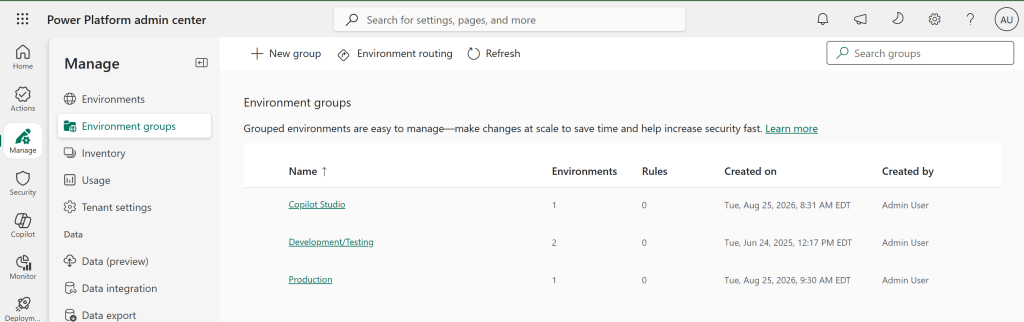

The new group appears in the list after a few moments. It is empty and none of its rules are configured. Write the group’s purpose into the description field rather than treating it as optional. Six months from now, a colleague looking at a group called Tier 2 will need to know what qualifies an environment for membership.
If you prefer to automate, the Power Platform for Admins V2 connector supports creating and deleting environment groups and adding or removing environments from them. That opens the door to provisioning flows that create a group per project and place environments into it without an administrator touching the portal.
Configuring and publishing rules
Open the group, select the Rules tab, and you see the full list of available rules. Select a rule to open its configuration panel, adjust it, and save. Repeat for each rule your scenario needs, then select Publish rules in the command bar.


Once published, the effect is visible from the other side. An administrator opening the corresponding setting inside a member environment finds it read only, with a message directing them to the environment group.
Routing new developer environments into a group
Environment groups become considerably more valuable when combined with default environment routing. Instead of new makers building in the shared default environment, routing provisions a dedicated developer environment for each maker and can place it directly into a group you nominate.
From the Environment groups page, select Environment routing in the command bar, choose the target group under the Environment group section, and save.

From then on, when a new maker triggers creation of a personal developer environment, the platform creates it inside the specified group as a managed environment with the group’s rules already applied. The maker does not choose an environment or configure anything. They land in a governed space.
This is the single highest leverage configuration in the entire feature set. It converts governance from a detection and remediation problem into a provisioning default. Note that changing the routing target later only affects new environments. Developer environments already created stay in whichever group they were originally placed unless you move them manually.
Adding, creating, and removing environments
To add existing environments, open the group, select Add environments in the command bar, pick one or more environments, and select Add. Two things to know about the picker: environments without Dataverse cannot be selected at all, and an environment that has Dataverse but is not managed can be upgraded to managed automatically as part of the add operation.

You can also assign a group at creation time. On the Environments page, select New, choose a group, and complete the remaining details. The environment is created as a managed environment inside that group and inherits the rules on creation.

Removing works from inside the group: select the environment, then Remove from group. Deleting a group requires that you first remove all of its environments and confirm no developer environments are routed to it. If the group still contains environments, the portal blocks the delete with a warning.
Every rule, and what it does for administration
Microsoft currently publishes twenty three rules for environment groups. Read as an alphabetical list they look like an inventory of unrelated toggles. Read by governance domain, they resolve into four coherent control surfaces: containing the blast radius of what makers build, phasing AI adoption, protecting production from unreviewed change, and keeping the platform operable.

Security and sharing
Sharing rules are the closest thing environment groups offer to a blast radius control. In a low code platform, the security question is rarely whether someone can build something. It is how many people that something reaches before anyone reviews it.
Sharing controls for canvas apps
Governs how widely a maker can share a canvas app, including the ability to prevent sharing with everyone in the tenant and to cap the number of individual users an app can be shared with.
Administrative benefit: this is your defence against the unreviewed app that quietly becomes business critical. Capping individual shares pushes makers toward security groups, which means access is managed by your identity team through existing joiner, mover, and leaver processes rather than by a maker adding names one at a time. Published at group level, the cap is identical across a personal productivity estate of thousands of environments without a single per environment touch.
Sharing controls for solution-aware cloud flows
Applies the equivalent limits to solution-aware cloud flows, controlling who can be added as a co-owner or given run only access.
Administrative benefit: flows are a heavier security object than apps because a co-owner inherits access to the connections the flow uses. Every additional co-owner is effectively another holder of whatever credentials that flow runs under. Constraining co-ownership at group level keeps automation ownership deliberate and makes the eventual orphaned flow conversation tractable.
Sharing agents with Editor permissions
Limits who can be granted editor rights on a Copilot Studio agent.
Administrative benefit: an agent editor can change instructions, add or remove knowledge sources, and modify topics. That is change control over an AI system that speaks to your users in your organization’s voice. Treat the editor list with the same seriousness you would treat write access to a production application, and enforce it centrally so a single group rule covers every agent built anywhere in the group.
Sharing agents with Viewer permissions
Limits who can be granted viewer access to an agent, including whether an agent can be shared with everyone.
Administrative benefit: the viewer list is the audience for whatever the agent can retrieve. An agent grounded on internal documentation is a data access surface, and sharing it broadly is functionally a data classification decision made by a maker. This rule is particularly valuable in a personal productivity group, where restricting agent sharing prevents in-progress experiments from being exposed before anyone has reviewed what they are grounded on.
Advanced connector policy (preview)
Extends connector governance below the connector level to individual connector actions, rather than the classic business, non-business, and blocked classification.
Administrative benefit: classic data policies force an all or nothing decision on each connector, which produces the familiar deadlock where a connector is blocked tenant wide because of one dangerous action. Action level policy lets you permit read operations while blocking destructive ones, which unblocks legitimate scenarios without widening exposure. Publishing it through a group means the nuanced policy travels with the environment population it was designed for.
Content security policy
Controls content security policy headers for Power Apps, typically with a reporting mode and an enforcement mode.
Administrative benefit: this is a browser level defence against script injection and clickjacking that most organizations want everywhere but roll out nowhere, because enabling it environment by environment and monitoring for breakage is a project nobody sponsors. As a group rule it becomes a single decision. Run the reporting mode across a group, review what would have been blocked, then move the same group to enforcement.
Accessing transcripts from conversations in Copilot Studio agents
Controls access to the transcripts of conversations users have with agents in the environment.
Administrative benefit: transcripts are simultaneously your best debugging and quality signal and your most sensitive data store, because users type whatever they type into a chat box. Controlling transcript access at group level lets you make one privacy posture decision per population: open access in a pilot group where improving the agent is the priority, restricted access in a production group handling customer or employee data. It also gives your privacy team a single place to point to during a review.
AI enablement
Seven of the twenty three rules govern AI. That ratio is itself a statement about where Microsoft expects governance pressure to sit. The common thread is that these rules let you say yes to AI in one part of the estate and not yet in another, which is a far more defensible position than a tenant wide switch in either direction.
AI-powered Copilot features
Governs the Copilot authoring and in-app AI experiences available in Power Apps within the environment.
Administrative benefit: the primary control for phased rollout. Create a pilot group with these features on, keep production and regulated environments in a group where they are off, and expand by moving environments between groups or updating rules as confidence grows. You get a documented, reversible adoption path instead of a binary tenant decision that someone will eventually ask you to justify.
Generative AI settings
Governs cross geography data movement for generative AI features, which matters because generative capabilities are not available in every region at the same time and using them may require data to be processed elsewhere.
Administrative benefit: this is the rule that makes regional grouping worth doing. A European group and a North American group can carry genuinely different answers to the cross region question, enforced rather than documented. When a data protection officer asks whether generative AI processing leaves the region for a given set of environments, the answer is a published rule you can screenshot rather than an assurance you have to verify environment by environment.
AI prompts
Enables or disables AI prompts in Power Platform and Copilot Studio.
Administrative benefit: prompts are where business data meets a model in a maker authored, largely unreviewed way, and they consume capacity. Controlling them per group ties both the data exposure and the consumption to a population you have consciously authorized. If your credit consumption is unpredictable, this rule combined with group boundaries turns an untraceable tenant wide spend into an attributable one.
External models
Governs whether external large language models can be used for generative responses in the environment.
Administrative benefit: model inventory is becoming an audit question. Organizations are increasingly required to state which models process their data and under what terms. This rule keeps that inventory knowable by preventing makers from quietly introducing a model your legal and security review has never seen. Allow it in a sanctioned experimentation group where the review has happened, block it everywhere else.
Preview and experimental AI models
Gates access to AI models that have not reached general availability.
Administrative benefit: preview models carry different support, compliance, and stability commitments than generally available ones. Nobody intends to build a business critical process on a preview model, but it happens when the preview model is simply available and produces better output. Blocking preview models in production groups while allowing them in a dedicated evaluation group makes the boundary structural instead of a policy statement makers may not have read.
AI-generated descriptions (preview)
Controls whether Copilot can generate an app description automatically when a maker saves or publishes a canvas app.
Administrative benefit: a small rule with a specific value. It is generally a productivity win, because app descriptions are the metadata your inventory reporting depends on and makers rarely write them. Where you need it off is environments handling sensitive material, since generating a description means app content and structure are processed by a model. Group level control lets you take the productivity benefit broadly and make a narrow exception, which is the correct shape for this trade-off.
Sharing data between Copilot Studio and Viva Insights
Controls whether Copilot Studio agent data is shared with Viva Insights.
Administrative benefit: any cross service data flow involving employee interaction data deserves a deliberate decision rather than a default. In several jurisdictions this is a works council or employee representation conversation before it is a technical one. Making it a published group rule means the decision has a location, an owner, and a change history, which is exactly what you need when someone asks who approved it.
ALM and code quality
This is where environment groups pay for themselves in operational stability. Every rule in this domain answers the same question: what is allowed to change in this environment, and who checked it?
Solution checker enforcement
Runs solution checker during solution import and determines whether results are advisory or blocking.
Administrative benefit: a quality gate that a local administrator cannot switch off under deadline pressure, which is precisely when quality gates get switched off. Setting it to warn in a development group and to block in a production group gives teams fast feedback while they build and a hard stop at the boundary that matters. It also shifts the security conversation left, because solution checker surfaces a class of issues that would otherwise be found in production or not at all.
Unmanaged customizations
Blocks unmanaged customizations in the environment.
Administrative benefit: the single most effective rule against configuration drift. Unmanaged changes made directly in production are the reason redeployments behave unpredictably, the reason a fix that worked in test fails in production, and the reason nobody trusts that the source solution reflects reality. Blocking them makes production a deployment target rather than an editing surface. Published at group level, it applies to every production environment at once, including ones added next year.
Default deployment pipeline (preview)
Associates environments in the group with a deployment pipeline by default.
Administrative benefit: most ALM programs fail on adoption rather than tooling. Pipelines exist, and teams route around them because setting one up is an extra step at the exact moment someone is trying to ship. Making the pipeline the default for every environment in the group inverts that: using ALM becomes the path of least resistance and bypassing it becomes the deliberate act. This is the rule to watch if you are responsible for deployment discipline across many teams.
Release channel
Sets which update cadence environments in the group follow.
Administrative benefit: this rule turns Microsoft’s release cadence into your regression testing schedule. Put a development or test group on the faster channel and your production group on the slower one, and your teams encounter platform changes weeks before those changes reach the environments where a regression would cost you. Without groups, that arrangement requires per environment configuration and constant vigilance to keep new environments aligned. With groups it is structural.
Power Apps component framework for canvas apps
Controls whether code components built with the Power Apps component framework can be used in canvas apps.
Administrative benefit: code components are custom code running inside your apps, which places them in a different review category from configuration. Some organizations want them broadly, some want them only where a code review process exists. Group level control lets you enable them for the professional development population and leave them off in citizen developer sandboxes, which is a more precise answer than the tenant wide toggle most administrators are used to.
Power Apps code apps
Controls whether code apps, the code first application model in Power Apps, are permitted in the environment.
Administrative benefit: code apps bring genuine software engineering into the platform, and with it genuine software engineering obligations around source control, dependency management, and review. Enabling them where those practices exist and withholding them where they do not is a governance decision, not a licensing one. Making it a group rule means the capability follows the population that is equipped for it.
Operations and maker experience
Three rules, but they carry recovery capability, reporting, and maker onboarding for the entire group.
Back-up retention
Sets how long system backups are retained for environments in the group. Managed environments support a longer retention window than the standard default.
Administrative benefit: recovery point objective expressed as configuration rather than as a line in a policy document nobody has validated. The realistic failure mode here is not that an administrator chooses the wrong retention. It is that a new production environment is provisioned six months from now and nobody remembers to extend its retention until the day someone needs a restore. A group rule applies to every future member automatically, which removes the human step entirely.
Usage insights
Enables the usage insights digest for environments in the group.
Administrative benefit: visibility without building a reporting solution. For a large routed developer environment population this is the difference between knowing your estate and guessing at it, and it is your primary input for identifying environments that were created, used twice, and abandoned. Enabling it consistently across a group also gives you comparable data, which matters when you are trying to distinguish a genuinely idle environment from a seasonal one.
Maker welcome content
Presents custom welcome content to makers when they enter the environment.
Administrative benefit: the only rule in the list that communicates rather than restricts, and it is undervalued for that reason. Governance guidance delivered in a policy portal is guidance nobody reads. The same guidance delivered at the moment a maker enters their environment reaches them when it is relevant. Use it to point at your naming standards, your support channel, and your criteria for promoting something out of a sandbox. Every rule you enforce elsewhere becomes less confrontational when this rule explains it first.
A starting group design
Because an environment can only belong to one group, group design is an architecture decision rather than a tagging exercise. The structure below works for most organizations and can be adapted from there.
| Group | Contains | Rule posture |
|---|---|---|
| Personal Productivity | Routed maker developer environments | Restrict agent and app sharing, maker welcome content on, usage insights on, AI features scoped to what an individual sandbox should have |
| Development and Test | Project build and validation environments | Faster release channel, solution checker set to warn, unmanaged customizations permitted, preview capabilities allowed |
| Production | Business facing environments | Solution checker set to block, unmanaged customizations blocked, maximum backup retention, preview and experimental capabilities off |
| AI Pilot | Environments designated for AI evaluation | Copilot features on, preview models permitted, external models permitted where reviewed, transcript access open for quality work |
If data residency is a hard requirement for you, the regional dimension will likely have to be the primary one, giving you groups such as Production EU and Production NA. That multiplies your group count and is a strong argument for automating group management through the admin connector rather than the portal.
What environment groups do not solve
Three honest limitations belong in any planning conversation.
- They are not a replacement for data policies. Classic data loss prevention policies still operate at their own scope and remain your primary connector governance mechanism. Environment groups complement them.
- They require managed environments. Governance at this level is a premium licensing conversation before it is a technical one. Confirm your licensing position before you design around the capability.
- There is no exception model. No per environment override exists inside a group today. Every exception becomes either a new group or an environment sitting outside all groups, and both options carry ongoing management cost.
Rollout checklist
- Decide your primary grouping dimension and write down why, because you only get one.
- Confirm the environments you intend to group are managed, or plan the upgrade.
- Export the current configuration of every candidate environment, specifically sharing limits, maker welcome content, solution checker, usage insights, backup retention, and generative AI settings, since these are the settings that get overwritten on entry.
- Create the group and configure only the rules your scenario requires. Leave the rest at environment level.
- Publish, then add one non critical environment and verify the locked state from the environment side before proceeding.
- Add the remaining environments in waves rather than all at once.
- Point environment routing at your personal productivity group so new maker environments are governed on creation.
- Document who holds edit rights at the group level, because that is now the only path to changing a locked setting.
- Schedule a review, since rules move from preview to general availability and new rules are added regularly.
Closing thought
The strategic value of environment groups is not the rules themselves. Nearly every rule on the list existed as an environment level setting before groups arrived. What changed is where the decision lives. Moving a setting from a thousand environments to one group converts governance from something that has to be maintained into something that is simply true, and it converts a new environment from a governance liability into a governed asset the moment it is created.
If you do nothing else after reading this, configure environment routing to place new developer environments into a governed group. That single change addresses the largest source of ungoverned sprawl in most tenants.
Sources
- Environment groups, Microsoft Learn
- Rules for environment groups, Microsoft Learn
- Managed environments overview, Microsoft Learn
- Limit sharing in managed environments, Microsoft Learn
- Maker welcome content, Microsoft Learn
Rule availability and preview status change frequently. Verify the current rule list in Microsoft Learn before finalizing a governance design.